As digital content continues to grow at an exponential rate, businesses face increasing challenges in managing their assets. Whether it’s images, videos, or documents, traditional storage systems often fail to meet the needs of modern teams. They become disorganized, hard to manage, and time-consuming, leading to inefficiencies and frustration. This is where Digital Asset Management (DAM) systems come in, providing an effective solution to store, organize, and access digital assets with ease.
In this blog, we’ll walk you through the essential steps to migrate from traditional storage to a Digital Asset Management (DAM) system the right way, with a focus on how Wizbrand can help streamline the entire process.
Why Migrate to a DAM System?
Before we dive into the migration process, it’s important to understand why moving from traditional storage to a DAM system is essential. Traditional storage systems—whether on physical hard drives, shared drives, or basic cloud storage—often lack the advanced features needed to manage and optimize digital assets for modern workflows.
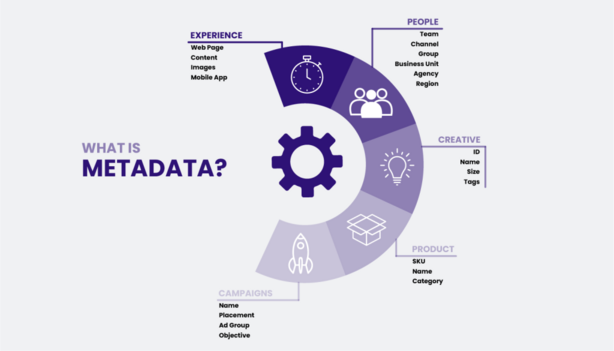
A Digital Asset Management system, on the other hand, helps centralize assets, improve collaboration, and ensure that your team always has access to the right content at the right time. Features like metadata tagging, advanced search functionality, and version control make a DAM system an indispensable tool for businesses of all sizes.
Wizbrand, a leading Digital Asset Management solution, offers a seamless transition from traditional storage to a modern DAM system, making the process easy and efficient. Let’s explore the steps involved in migrating to DAM.
Step 1: Assess Your Current Storage System
The first step in migrating to a DAM system is to assess your current storage system. Take stock of where your digital assets are stored, how they are organized, and the current pain points your team faces when managing these assets. Is there an easy way to find the files you need? Are your assets spread across multiple locations? How much time is spent searching for assets?
Understanding these challenges will help you identify the right features and capabilities your DAM solution should offer. By performing this audit, you’ll also be able to determine how much data you need to migrate and set clear goals for the migration process.
Step 2: Choose the Right DAM Solution
Choosing the right DAM solution is crucial to the success of your migration. Look for a system that meets your specific needs, whether that’s advanced search capabilities, easy integrations, or user-friendly interfaces. Wizbrand stands out as one of the Best Digital Asset Management Software solutions available today. It offers robust features that allow businesses to easily organize, manage, and distribute digital assets.
Wizbrand provides an intuitive platform that makes it easier for teams to manage large volumes of digital content, integrate with other tools, and collaborate seamlessly. With Wizbrand, businesses can enjoy an organized system that ensures assets are always easily accessible when needed.
Step 3: Prepare Your Assets for Migration
Once you’ve chosen your DAM system, the next step is to prepare your assets for migration. This may include organizing files into folders, labeling them with appropriate metadata, and ensuring that there is consistency in naming conventions.
If your assets are stored in a disorganized manner, this step may require some time and effort. However, it’s essential to establish a clean structure from the outset to ensure a smooth migration to your DAM system. By doing this, your team will benefit from a more organized and easily searchable repository of assets once the migration is complete.
Wizbrand’s platform allows you to easily upload and organize your assets, making it a convenient choice for businesses looking to streamline their workflow. You can assign metadata to each file, making it easier for your team to search for and find files based on attributes like project name, date, or content type.
Step 4: Migrate Your Assets to the DAM System
The actual migration process involves transferring your assets from traditional storage to your DAM system. This may involve bulk uploading files, integrating with other platforms, or using the DAM’s API for direct integration.
One of the benefits of using Wizbrand is its easy-to-use interface and efficient migration tools. You can quickly upload large batches of assets, tag them with metadata, and organize them into the appropriate categories. Additionally, Wizbrand offers integrations with other popular tools, such as Google Drive and Adobe Creative Cloud, to ensure that your digital assets are seamlessly transferred into the new system.
Step 5: Set Up Metadata and Taxonomy
Once your assets are uploaded, it’s time to organize them with metadata. Metadata includes keywords, descriptions, and other attributes that make it easier to search for and retrieve assets in the future. Wizbrand’s DAM system allows you to create a custom taxonomy and assign metadata to each asset to ensure that they are easy to find.
Setting up metadata and taxonomy correctly is essential for maximizing the effectiveness of your DAM system. When done properly, it helps improve searchability, making it easier for your team to find the right files at the right time.
Step 6: Train Your Team
Training is a critical component of the migration process. No matter how user-friendly your DAM system is, it’s important to ensure that your team understands how to use it effectively. Provide training sessions and documentation to help your team familiarize themselves with the system. Highlight the key features of Wizbrand’s platform, such as its search capabilities, tagging features, and the ability to collaborate on projects.
Proper training will ensure that your team is able to take full advantage of the new system, helping them streamline workflows and save time on content management tasks.
Step 7: Optimize and Maintain Your DAM System
The migration process doesn’t end once the assets are uploaded and your team is trained. It’s important to continuously optimize and maintain your DAM system to ensure it stays organized and efficient as your business grows. Regularly audit your assets, update metadata, and remove outdated content to keep the system clean and effective.
Wizbrand offers analytics tools that allow you to track how your team is interacting with assets, so you can make data-driven decisions to improve the system.

Conclusion: Embrace the Future of Digital Asset Management with Wizbrand
Migrating from traditional storage to a DAM system is a powerful step toward optimizing your content management workflows. With the right strategy and tools, such as Wizbrand’s Best DAM Tools in the world, you can ensure a smooth migration process that benefits your business in the long run. By centralizing your assets, improving collaboration, and streamlining your workflows, your team can focus on what matters most: creating exceptional content.