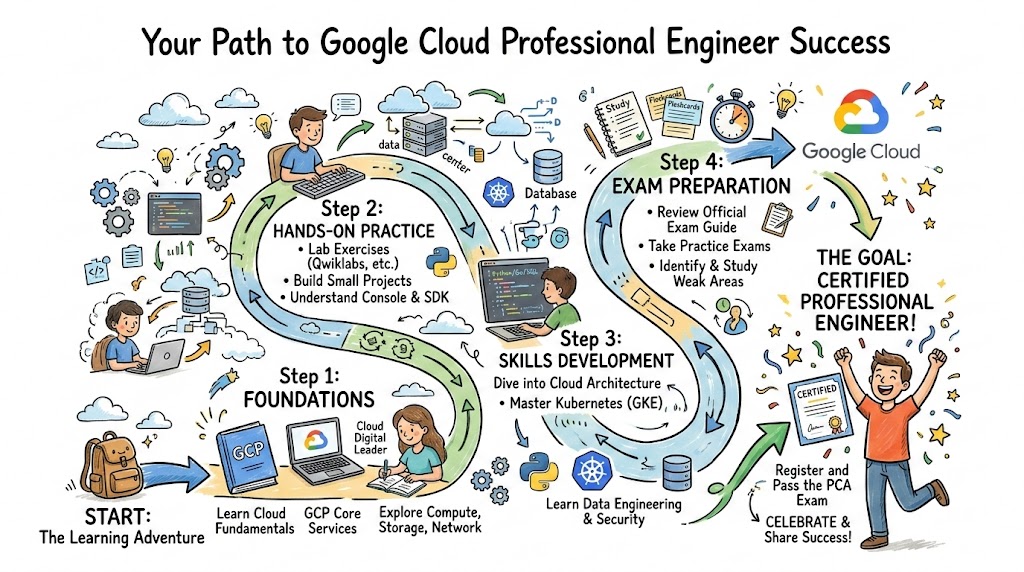
Introduction
The Google Cloud Professional Engineer certification is one of the most sought-after credentials for professionals working in cloud technologies. As cloud services continue to evolve, mastering the ins and outs of Google Cloud Platform (GCP) is crucial for engineers who aim to build, scale, and manage cloud solutions efficiently.In this guide, we’ll take you through the details of the Google Cloud Professional Engineer certification, its requirements, skills you’ll gain, preparation plan, and much more. Whether you’re a working engineer, software developer, or manager, this guide will provide a comprehensive roadmap to obtaining this prestigious certification and advancing your career in the cloud domain.
What is Google Cloud Professional Engineer?
The Google Cloud Professional Engineer certification is a high-level credential that validates your ability to design, develop, manage, and secure infrastructure and applications on Google Cloud. Google Cloud Platform (GCP) is one of the top cloud providers, offering a variety of services ranging from computing and storage to advanced AI/ML tools. This certification is designed for experienced professionals who already have a foundational understanding of cloud computing and want to specialize in Google Cloud’s tools and services.
Google Cloud’s growing suite of services means that businesses and organizations increasingly rely on experts who can not only use these tools effectively but also design systems that are scalable, secure, and optimized. As a Professional Cloud Engineer, you’ll have the skills to manage cloud systems and applications at scale, which is critical for organizations shifting to the cloud or optimizing their current infrastructure.
Who Should Take It?
This certification is best suited for professionals who already have some experience working with cloud technologies and want to further specialize in Google Cloud. The typical candidates include:
- Cloud Engineers: Professionals who already manage cloud environments and want to solidify their expertise with Google Cloud.
- Solutions Architects: Individuals responsible for designing and architecting systems who wish to become proficient in Google Cloud’s services.
- DevOps Engineers: Professionals focused on automation, CI/CD pipelines, and system scalability who want to learn GCP’s relevant tools.
- Software Engineers: Engineers who design, build, and deploy applications, especially in cloud-native environments, and want to specialize in GCP.
- Platform Engineers: People responsible for building and managing platforms, deploying applications, and automating infrastructure on Google Cloud.
Skills You’ll Gain
After obtaining the certification, you’ll have the following key skills:
- Cloud Infrastructure Management: How to provision, configure, and manage the resources available on Google Cloud (e.g., compute engines, databases, and storage solutions).
- Security Management: Understanding how to secure resources in Google Cloud, including Identity & Access Management (IAM), data encryption, and compliance.
- Network Setup and Management: Configuring virtual private clouds (VPCs), firewall rules, load balancing, and inter-region communication.
- Cost Optimization: GCP offers a pay-as-you-go pricing model. This certification ensures you understand how to monitor and control your usage to reduce costs.
- Automation: How to automate workflows using Google Cloud tools such as Cloud Functions, Google Kubernetes Engine (GKE), and Google Cloud Build.
- Troubleshooting and Monitoring: Using Google Cloud’s suite of monitoring and logging tools to troubleshoot issues and optimize performance.
- Deployment of Cloud-Native Applications: Leveraging tools like GKE and App Engine to build, deploy, and scale applications seamlessly in the cloud.
Real-World Projects You Should Be Able to Do After It
Once you pass the Google Cloud Professional Engineer exam, you’ll be equipped to work on the following real-world projects:
- Build Scalable Web Applications: Develop and deploy applications that can scale horizontally on Google Kubernetes Engine (GKE) or Cloud Run, optimizing for high availability.
- Migrate On-Premise Infrastructure to GCP: Migrate a legacy on-premise system to Google Cloud while ensuring minimal downtime and smooth transition.
- Design Disaster Recovery Plans: Design and implement highly available systems that include backup, failover, and disaster recovery processes using GCP tools.
- Implement Monitoring and Alerting: Set up logging, monitoring, and alerting systems using Google Cloud’s Stackdriver suite to proactively manage infrastructure health.
- Security Implementations: Implement a robust security model, including IAM configurations, encryption strategies, and security scanning for applications deployed on GCP.
- Cost Management: Utilize Google Cloud’s cost optimization tools like the Google Cloud Pricing Calculator and Cloud Billing to manage and track costs effectively.
Preparation Plan
7-14 Days Preparation Plan
- Day 1-3: Understand Google Cloud’s core services like Compute Engine, Cloud Storage, and Cloud SQL. Focus on their basic setup and management.
- Day 4-7: Dive deeper into GKE (Google Kubernetes Engine) for containerized applications. Learn how to deploy apps, scale, and manage workloads.
- Day 8-10: Focus on Identity & Access Management (IAM), a crucial component for controlling access to cloud resources. Understand how to configure roles, permissions, and policies.
- Day 11-14: Learn cost management strategies. Go through Billing Reports and Budgets & Alerts in Google Cloud to ensure you can effectively manage cloud costs.
30 Days Preparation Plan
- Week 1: Cover all GCP basics—compute, networking, storage, and database services. Focus on the key infrastructure services like Compute Engine and Cloud Networking.
- Week 2: Dive into containerized services like Google Kubernetes Engine and Cloud Run. Learn how to orchestrate containers and manage deployments.
- Week 3: Explore Google Cloud Security—learn about IAM, VPCs, VPNs, and private Google access. Also, familiarize yourself with Audit Logs and Cloud Security Command Center.
- Week 4: Focus on Google Cloud Monitoring (formerly Stackdriver), set up Cloud Logging, Monitoring, and Alerting. Prepare for the exam by going through sample questions and hands-on labs.
60 Days Preparation Plan
- Week 1-2: Start with in-depth learning of cloud networking, focusing on VPC, Subnets, Cloud DNS, and Load Balancing.
- Week 3-4: Deep dive into Cloud Automation—learn to deploy automated CI/CD pipelines, Google Cloud Build, and Cloud Functions.
- Week 5-6: Focus on advanced security strategies and audit logging, as well as Google’s Cloud Storage and Cloud Databases. Study resource management and optimization techniques for scalability.
- Throughout: Work on mock exams, review your notes, and continuously practice with Google Cloud Console to become familiar with the environment.
Common Mistakes to Avoid
- Skipping Real-World Practice: Theory is important, but hands-on practice is crucial for understanding how Google Cloud services work.
- Not Learning Cost Management: GCP offers powerful cost optimization tools, and neglecting them could lead to unnecessary expenditure.
- Overlooking Security: Security is paramount in cloud computing. Make sure to understand how to manage IAM, VPNs, and access control policies.
- Skipping Review of Exam Objectives: Don’t just study randomly; make sure your preparation covers every exam objective. Google provides exam blueprints, which should be reviewed regularly.
Best Next Certification After This
After successfully earning the Google Cloud Professional Engineer certification, you might consider pursuing one of the following certifications to continue building your cloud expertise:
- Google Cloud Professional Cloud Architect: Dive deeper into the design and architecture of cloud infrastructure.
- Google Cloud Professional Security Engineer: Specialize in securing cloud solutions, understanding GCP’s security and compliance features.
- Google Cloud Associate Cloud Engineer: If you want to solidify your foundational knowledge and start from a more entry-level certification.
Choose Your Path: Google Cloud Certifications
Here are learning paths that align with different roles you can pursue after completing the Google Cloud Professional Engineer certification:
- DevOps: Focuses on automation, configuration management, and CI/CD pipelines.
- DevSecOps: Combines development, security, and operations practices to ensure secure cloud applications.
- SRE: Site Reliability Engineering is a discipline focused on maintaining high availability, reliability, and scalability of cloud applications.
- AIOps/MLOps: Leverages artificial intelligence and machine learning in the operations process, automating tasks and improving system performance.
- DataOps: Specializes in the operationalization of data pipelines, ensuring data quality, compliance, and effective use in cloud environments.
- FinOps: Focuses on managing the financial aspects of cloud usage, optimizing costs, and ensuring the financial efficiency of cloud services.
Role → Recommended Certifications
Here’s a list of roles with recommended certifications:
| Role | Recommended Certifications |
|---|---|
| DevOps Engineer | Google Cloud Professional Cloud DevOps Engineer |
| SRE | Google Cloud Professional Cloud Architect |
| Platform Engineer | Google Cloud Professional Cloud Engineer |
| Cloud Engineer | Google Cloud Associate Cloud Engineer |
| Security Engineer | Google Cloud Professional Security Engineer |
| Data Engineer | Google Cloud Professional Data Engineer |
| FinOps Practitioner | Google Cloud Financial Engineer or similar |
| Engineering Manager | Google Cloud Certified Architect (Professional) |
Comparison Table: Google Cloud Professional Engineer vs Other Cloud Certifications
| Certification | Track | Level | Who It’s For | Prerequisites | Skills Covered | Recommended Order | Cost |
|---|---|---|---|---|---|---|---|
| Google Cloud Professional Engineer | Cloud Engineering | Professional | Cloud Engineers, DevOps Engineers, SREs | Knowledge of cloud platforms and hands-on GCP experience | Infrastructure Design, Cloud Security, Automation, Networking, Cost Management, Monitoring | Start with Associate Cloud Engineer | $200 |
| Google Cloud Professional Cloud Architect | Cloud Architecture | Professional | Architects, Senior Cloud Engineers | Experience with cloud technologies and Google Cloud | Cloud Architecture, Networking, Security, GCP Services Design, Multi-Region Deployment | Google Cloud Professional Engineer | $200 |
| Google Cloud Professional Cloud DevOps Engineer | Cloud DevOps | Professional | DevOps Engineers, Automation Engineers | DevOps or cloud experience, familiarity with CI/CD | Automation of Cloud Deployments, Infrastructure as Code, CI/CD Pipelines, Monitoring, Security, Cost Optimization | Google Cloud Professional Engineer | $200 |
| AWS Certified Solutions Architect – Professional | Cloud Architecture | Professional | Cloud Architects, Systems Engineers | Associate-level AWS certification | Designing Highly Available Systems, Cost Optimization, Security Best Practices, Multi-Region Deployment | AWS Certified Solutions Architect – Associate | $300 |
| Microsoft Certified: Azure Solutions Architect Expert | Cloud Architecture | Expert | Cloud Architects, Azure Engineers | Azure Fundamentals or equivalent experience | Designing Cloud Infrastructure, Networking, Security, Identity, Governance, and Management | Microsoft Certified: Azure Architect Associate | $165 |
| Certified Kubernetes Administrator (CKA) | Cloud DevOps | Professional | DevOps Engineers, Kubernetes Admins | Experience with Kubernetes and containerized systems | Kubernetes Cluster Management, Networking, Security, Storage, Troubleshooting, and Performance Tuning | Google Cloud Professional Engineer, then CKA | $300 |
| AWS Certified DevOps Engineer – Professional | Cloud DevOps | Professional | DevOps Engineers, Cloud Automation Engineers | AWS Certified Developer – Associate or SysOps Admin | CI/CD, Monitoring, Automation, Security, Cost Management, Infrastructure as Code | AWS Certified Solutions Architect – Associate | $300 |
FAQs
1. How difficult is the Google Cloud Professional Engineer certification?
The exam is moderately difficult. It tests your ability to design and manage cloud infrastructure and requires both theoretical knowledge and hands-on experience.
2. How much time should I dedicate to preparing for this certification?
Typically, 1–2 months of focused preparation is sufficient if you already have cloud experience.
3. What is the exam format?
The exam consists of multiple-choice and multiple-select questions, lasting for about 2 hours.
4. What are the prerequisites for the exam?
There are no formal prerequisites, but familiarity with cloud platforms, especially GCP, is recommended.
5. How do I register for the certification exam?
You can register for the exam on Google Cloud’s official certification page.
6. How much does the exam cost?
The exam costs $200 USD.
7. What topics are covered in the exam?
The exam covers core GCP services such as compute, storage, networking, and security management.
8. Can I retake the exam if I fail?
Yes, you can retake the exam after a 14-day waiting period.
Top Institutions Offering Training and Certifications for Google Cloud Professional Engineer
1. DevOpsSchool
DevOpsSchool is a well-known platform offering expert-led Google Cloud training programs. Their courses cover a wide range of cloud technologies, with a particular focus on Google Cloud services. With a practical approach and hands-on labs, DevOpsSchool prepares students to become proficient Google Cloud professionals and pass certifications like the Google Cloud Professional Engineer exam.
2. Cotocus
Cotocus provides specialized cloud training and certification preparation for professionals looking to advance their careers in cloud technologies, including Google Cloud. Their Google Cloud Professional Engineer training is tailored for both beginners and experienced professionals, with an emphasis on real-world cloud implementations and practical skills.
3. ScmGalaxy
ScmGalaxy offers high-quality training and certification courses focused on cloud computing and DevOps practices. Their Google Cloud Professional Engineer certification program equips candidates with the necessary skills to manage and deploy applications on Google Cloud while optimizing performance, security, and cost-efficiency.
4. BestDevOps
BestDevOps offers Google Cloud training that covers various aspects of cloud computing, security, automation, and infrastructure. Their programs are designed to ensure professionals gain hands-on experience with Google Cloud tools, preparing them for the Professional Engineer certification exam and making them ready to manage scalable cloud solutions.
5. devsecopsschool
devsecopsschool specializes in DevSecOps training and certification, which is crucial for professionals focusing on security in cloud environments. They provide in-depth courses on securing Google Cloud solutions and mastering Google Cloud Professional Engineer certification, with a focus on integrating security at every stage of cloud infrastructure development.
6. sreschool
sreschool offers training programs specifically for Site Reliability Engineers (SREs), including courses on Google Cloud. Their training curriculum aligns with Google Cloud’s professional certifications, focusing on building and maintaining reliable, scalable cloud infrastructures and applications.
7. aiopsschool
aiopsschool focuses on artificial intelligence and operations, with training programs that include Google Cloud’s AI and machine learning offerings. Their courses help professionals in MLOps (Machine Learning Operations) become certified Google Cloud experts, with hands-on exposure to cloud-native AI tools.
8. dataopsschool
dataopsschool specializes in DataOps training, combining data management and cloud computing. Their courses provide in-depth knowledge of Google Cloud’s data services and teach students how to build, manage, and scale data pipelines using GCP tools, preparing them for the Google Cloud Professional Engineer certification exam.
9. finopsschool
finopsschool focuses on financial operations (FinOps) in the cloud, helping professionals understand how to optimize cloud costs while maintaining financial control. Their Google Cloud courses provide insight into managing resources effectively on GCP, ensuring cost optimization while preparing for the Google Cloud Professional Engineer exam.
FAQs
1. What is the Google Cloud Professional Engineer certification?
The Google Cloud Professional Engineer certification is an advanced-level exam that validates your skills in designing, deploying, managing, and securing infrastructure and applications on Google Cloud. It demonstrates your ability to architect and manage scalable and secure cloud environments.
2. Who should take the Google Cloud Professional Engineer certification?
This certification is ideal for cloud engineers, DevOps engineers, solutions architects, and SREs with experience in GCP or other cloud platforms who want to specialize in Google Cloud.
3. What are the prerequisites for taking this exam?
While there are no formal prerequisites, candidates should have hands-on experience with Google Cloud Platform services and a solid understanding of cloud infrastructure, networking, security, and automation practices.
4. How much time do I need to prepare for the exam?
The recommended preparation time is 1–2 months if you already have foundational knowledge and experience with GCP. For those with less experience, a more extended preparation plan of 2–3 months may be beneficial.
5. How difficult is the Google Cloud Professional Engineer exam?
The exam is moderately challenging and requires both theoretical knowledge and practical experience with Google Cloud services. It is designed for professionals with real-world experience in cloud architecture and management.
6. What is the format of the exam?
The exam consists of multiple-choice and multiple-select questions, with scenarios designed to test your ability to apply your knowledge in practical situations. The exam duration is 2 hours.
7. How much does the Google Cloud Professional Engineer exam cost?
The exam costs $200 USD, and the certification is valid for 2 years.
8. What topics are covered in the exam?
The exam covers topics like cloud architecture, networking, security, compute services, data storage, cost management, automation, monitoring, and troubleshooting.
9. How can I register for the certification exam?
You can register for the exam through the official Google Cloud certification website. After creating an account, you can schedule the exam at a Pearson VUE test center or take it online.
10. How long is the Google Cloud Professional Engineer certification valid?
The certification is valid for 2 years. After that, you’ll need to renew it by passing the exam again or completing the required recertification process.
11. What resources should I use to prepare for the exam?
Google Cloud offers a variety of training resources, including the official training courses, labs, documentation, and sample questions. Third-party platforms like DevOpsSchool, Cotocus, and others also provide specialized training programs.
12. Can I retake the exam if I fail?
Yes, you can retake the exam after a 14-day waiting period. However, you’ll need to pay for the retake as well.
Conclusion
The Google Cloud Professional Engineer certification is a powerful credential that opens the door to new career opportunities in cloud computing. With Google Cloud continuing to grow as one of the most popular platforms for infrastructure and application development, being certified will give you the expertise needed to design, deploy, and manage cloud solutions effectively.Whether you’re already working in the cloud space or you’re looking to transition into cloud engineering, this certification will solidify your skills and enhance your marketability. By following the recommended preparation plans and utilizing the available resources, you can confidently take the exam and set yourself up for a successful career in Google Cloud technologies.