
In today’s digital-first world, businesses of all sizes are producing and managing vast amounts of content across multiple platforms. Whether it’s images, videos, or documents, managing this content efficiently is crucial for smooth operations. However, as digital content grows, so do the challenges in managing it. This is where a Digital Asset Management (DAM) system comes in. A DAM system helps businesses organize, store, and retrieve digital assets seamlessly. But how do you implement a DAM system without creating unnecessary complexity? Let’s walk through the process step-by-step.
Understanding the Need for a DAM System
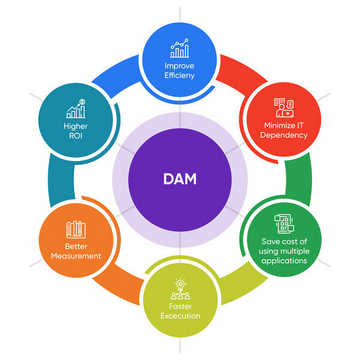
Before diving into implementation, it’s important to understand why your business needs a DAM system. Content is at the heart of marketing, SEO, social media, and much more. However, without a system to track, organize, and access content efficiently, your team might struggle to find what they need when they need it. A DAM system provides a single repository for all digital assets, offering organized, secure, and easy access for the team.
This makes collaboration more effective, enhances productivity, and ensures that content is always up-to-date. Moreover, it ensures that your brand assets are consistently applied across all marketing materials, helping to maintain a cohesive and professional brand identity.
The Steps to Implementing a DAM System Without the Headache
Implementing a DAM system doesn’t have to be daunting. With the right approach and the right tools, you can streamline the process and see tangible benefits almost immediately. Here’s a simple, step-by-step guide to make the implementation process as smooth as possible:
1. Assess Your Needs
Start by understanding your current content management workflows and the pain points that come with it. Are your files scattered across various systems? Is it hard to find specific digital assets when needed? Mapping out these issues will help you determine what features are essential in your DAM solution. Look for solutions that are scalable, intuitive, and fit within your team’s current workflow.
2. Choose the Right DAM Solution
When selecting a DAM system, it’s important to choose a solution that is aligned with your business needs. For instance, Wizbrand offers a comprehensive DAM solution that simplifies digital asset storage, retrieval, and collaboration. Wizbrand’s platform provides powerful features for content management, advanced search capabilities, and easy integration with other tools. It’s an excellent choice for businesses that want a reliable and scalable DAM solution.
3. Centralize Your Digital Assets
Once you have your DAM system in place, the next step is to consolidate all your digital assets into one centralized platform. This means transferring files from disparate storage systems into your DAM system. This might sound like a heavy task, but it’s essential for maintaining consistency and ensuring that every team member can easily access what they need.
With Wizbrand’s DAM system, this step is streamlined. The platform offers a user-friendly interface for quick uploads and easy organization of assets into folders. You can tag your assets with relevant keywords, making it easy to categorize and retrieve files when needed.
4. Establish Clear Organizational Structures
As your business grows, so will your digital assets. To avoid clutter, it’s crucial to create a clear and logical organizational structure. Start by categorizing assets by type (e.g., images, videos, PDFs) and then by usage (e.g., marketing materials, product photos, etc.).
Additionally, Wizbrand’s platform allows you to implement custom metadata for each asset. This makes it easy for your team to filter, search, and retrieve assets based on specific attributes like date, campaign, or content type.
5. Integrate with Your Existing Tools
One of the main benefits of a DAM system is its ability to integrate with other business tools. Wizbrand allows seamless integrations with popular platforms like Adobe Creative Cloud, Google Drive, and more. By integrating with these tools, your team can continue using their familiar software while benefiting from the efficiency of the DAM system.
Moreover, Wizbrand’s DAM solution also helps with improving SEO through its SEO Management Software. The platform allows you to optimize content metadata, which is key to ensuring your assets are found online.
6. Train Your Team
No matter how great your DAM system is, it’s only effective if your team knows how to use it. Provide training and create resources that walk your team through the new system. Highlight the benefits of using the DAM system, such as faster workflows, easy collaboration, and better content access. This ensures that everyone is on the same page and can maximize the full potential of the system.
7. Monitor and Optimize
The implementation process doesn’t end once your system is up and running. It’s important to monitor how well your DAM system is being used and optimize it for maximum efficiency. Regularly audit your assets, identify any gaps, and ensure that your team follows best practices for uploading and managing content.
Wizbrand’s DAM platform provides analytics tools that help track usage and performance, making it easier for you to see how your team is interacting with assets.
Why Choose Wizbrand for Your DAM Needs?
When it comes to Best Digital Asset Management Software, Wizbrand stands out due to its robust feature set, ease of use, and seamless integrations. It helps streamline digital workflows, improve collaboration, and ensures that your content is always organized and easily accessible.
Additionally, Wizbrand offers one of the Best DAM Tools in the world, making it an ideal choice for businesses that need a reliable and scalable solution to manage their growing content needs.
Conclusion
Implementing a DAM system doesn’t have to be overwhelming. By following these steps and choosing the right solution, like Wizbrand, you can easily centralize and manage your digital assets, optimize workflows, and improve team collaboration. With Wizbrand’s user-friendly platform, you’ll be able to streamline your digital operations and ensure your team can access the content they need—when they need it.