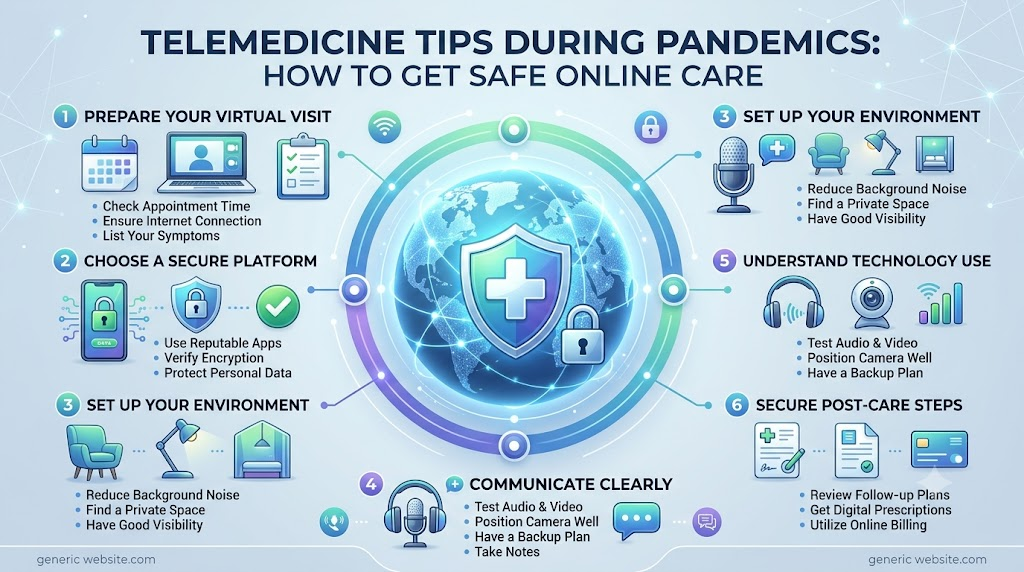
Introduction
Pandemics can make it harder to get regular medical care. Travel limits, infection risks, and crowded clinics may delay routine visits. People with ongoing health problems may also find it difficult to attend regular check-ups. Telemedicine offers another way to stay connected with healthcare professionals. It allows patients to discuss health concerns through video calls, phone calls, or secure messages. These virtual visits can help with many routine needs. However, they cannot replace every physical examination or emergency service. Good telemedicine tips during pandemics can help patients use online care safely and confidently. Patients should prepare before appointments, protect their personal information, and explain symptoms clearly. ASKDOCTORLIVE is a healthcare information resource that can help readers learn about medical topics and healthcare options. Understanding how virtual care works can make access to medical support easier during public health emergencies.
What Is Telemedicine and How Does It Work?
Telemedicine means getting medical advice through digital communication. Patients can speak with healthcare professionals without travelling to a clinic. This may happen through a video call, phone call, or secure online message.
The exact service depends on the healthcare provider. Some providers offer live video appointments. Others allow patients to send questions through a secure patient portal. A doctor may also review medical reports or photographs shared by the patient.
Some telemedicine services support remote monitoring. Patients may share selected health readings, such as blood pressure or blood sugar levels. A healthcare professional can review these readings and discuss the next steps.
A typical online appointment may include:
- A video or phone conversation with a healthcare professional.
- A review of symptoms and medical history.
- A discussion of current medicines and previous treatment.
- Sharing relevant reports or photographs.
- Advice about tests, treatment, or follow-up care.
- A referral for an in-person visit when needed.
Telemedicine helps patients communicate with doctors from home. However, not every provider offers all these options. Patients should check the available services before booking.
Why Telemedicine Matters During Pandemics
During a pandemic, visiting a crowded medical facility may increase contact with other people. Some patients may also face travel limits or difficulty reaching their regular doctor. Virtual healthcare can help reduce these problems.
Telemedicine allows patients to discuss many health concerns from home. It may reduce unnecessary travel and limit some contact with others. It can also help healthcare teams decide which patients need an in-person assessment.
Virtual care may support:
- Routine medical follow-ups.
- Discussions about ongoing health conditions.
- Reviews of selected test results.
- Basic advice for mild symptoms.
- Medicine reviews with a qualified professional.
- Mental health consultations.
- Guidance about when to seek further care.
This can be useful for older adults, people with limited mobility, and patients who need regular support. It may also help families manage care when normal services are disrupted.
However, telemedicine does not remove every infection risk. It also cannot replace essential hospital care. Patients should follow local public health advice and attend necessary medical visits.
Choose a Suitable Telemedicine Service
Choosing a suitable service is an important step. Patients should look for a provider that explains its process clearly. They should also understand who will review their health concerns.
Before booking, check these points:
- Professional qualifications: Confirm that the healthcare professional has suitable training and credentials.
- Licensing rules: Check whether the professional can provide care in your location.
- Consultation options: Find out whether video, phone, or secure messaging is available.
- Appointment process: Understand how to book, change, or cancel a visit.
- Medical records: Ask how reports and health details can be shared safely.
- Prescriptions: Check how prescriptions are handled under local rules.
- Technical support: Find out what happens if the connection fails.
- Follow-up care: Learn how to contact the provider after the appointment.
Patients should also ask how the service handles referrals. Some health concerns need a physical examination or laboratory testing. A suitable provider should explain these limits clearly.
Rules for telemedicine, prescriptions, and professional licensing vary by location. Patients should check local requirements before using a service.
Prepare Before Your Online Doctor Appointment
A little preparation can make an online appointment more useful. It helps patients explain their concerns and gives doctors important background information. Keep the main details ready before the appointment begins.
Write Down Your Symptoms
Record when each symptom started. Note whether it is getting better, worse, or staying the same. Include details such as pain, fever, cough, or changes in sleep.
Also note what makes symptoms better or worse. This can help the doctor understand your concerns.
Prepare Your Medical History
Write down existing health conditions and past treatments. Include known allergies and any recent hospital visits. Tell the doctor about important changes in your health.
Keep a Medicine List Ready
Prepare the names of your current medicines. Include their strengths and how often you take them. Mention vitamins, supplements, and medicines bought without a prescription.
Do not stop or change prescribed medicines without medical advice.
Collect Relevant Reports
Keep useful test results and medical records nearby. These may include blood reports, prescriptions, scan reports, or discharge summaries. Share only the information requested by your healthcare provider.
Prepare Questions
Write down your main concerns before the call. You may want to ask about symptoms, treatment choices, or follow-up steps. A written list can help you remember important points.
The table below brings these preparation steps together.
| Preparation Step | What Patients Should Do | Why It Helps |
|---|---|---|
| Symptom notes | Record symptoms and when they started | Helps explain concerns clearly |
| Medical history | Prepare details of existing conditions | Gives the doctor useful background |
| Medicine list | Write down current medicines | Supports safer medicine reviews |
| Medical reports | Keep relevant test results available | Helps the doctor review previous findings |
| Device check | Test the camera, microphone, and internet | Reduces technical interruptions |
| Private space | Choose a quiet and private location | Protects confidential discussions |
These simple steps can save time during the appointment. They also help patients share accurate information. Keep the notes nearby so you can refer to them during the call.
Set Up Your Device and Internet Connection
Technical problems can interrupt an online consultation. Preparing your device before the appointment can help prevent delays.
Use a smartphone, tablet, or computer with a working camera and microphone. Check your internet connection before the scheduled time. Charge your device or keep it connected to power.
Follow these steps:
- Install the required application before the appointment.
- Complete any needed updates.
- Test the camera and microphone.
- Choose a quiet place with good lighting.
- Keep your doctor’s contact details nearby.
- Close apps that may slow down your device.
- Ask whether a phone call is possible if video fails.
If you have trouble using the platform, contact the provider. Some services offer technical support or simple instructions. Do not wait until the appointment starts to test everything.
Protect Your Privacy During Telemedicine Consultations
Online consultations involve personal health information. This may include medical history, test results, and details about treatment. Patients should take basic steps to protect this information.
Choose a private room whenever possible. Avoid discussing sensitive health details in public places. Use the provider’s recommended platform rather than an unknown video service.
Follow these privacy tips:
- Avoid public Wi-Fi for sensitive consultations when possible.
- Keep your phone, computer, and apps updated.
- Use strong and unique passwords.
- Enable two-factor authentication when available.
- Do not share appointment links with other people.
- Ask before recording a consultation.
- Use headphones if others are nearby.
- Sign out of shared devices after the appointment.
Patients should also ask how the provider stores and protects medical information. Check its privacy notice to understand how health details may be used. Privacy protections can differ between services.
Communicate Clearly With Your Doctor Online
Clear communication helps doctors understand a patient’s concerns. Start by describing the main problem. Then explain when it began and how it has changed.
Share relevant medical history and current medicines. Mention any new symptoms, even if they seem unrelated. Be honest about your health and daily habits.
If a symptom is visible, the doctor may ask you to show it through the camera. Follow the doctor’s instructions and avoid unsafe movements. A camera view cannot replace every physical examination.
Ask the doctor to explain unfamiliar medical terms. Before ending the call, confirm medicine instructions and follow-up steps. Ask how to contact the provider if your symptoms change.
Use Telemedicine for Routine Care and Follow-Ups
Virtual doctor visits can support many routine healthcare needs. They may be useful when a patient does not need an immediate physical examination.
Common uses include:
- Follow-up discussions after treatment.
- Reviews of selected laboratory results.
- Medicine reviews.
- General health questions.
- Advice about mild symptoms.
- Chronic condition monitoring.
- Mental health support.
- Preventive health discussions.
A doctor must decide whether remote care is suitable. Some concerns need a physical examination or diagnostic tests. If the doctor recommends an in-person visit, follow that advice.
Managing Chronic Conditions Through Virtual Care
People with long-term health conditions may need regular medical support. Pandemics can make routine visits harder to arrange. Telemedicine may help patients stay in touch with their healthcare team.
For example, patients with diabetes may discuss selected blood sugar readings. People with high blood pressure may share home readings. Patients with asthma may discuss symptoms and their treatment plan.
Virtual care may also support heart disease reviews and medicine checks. Doctors can discuss lifestyle habits and review selected health measurements. They may also decide whether further tests are needed.
Patients should continue their prescribed treatment and usual monitoring plan. Do not change medicines based only on online information. Contact your healthcare professional if readings change or symptoms become worse.
Understand the Limits of Telemedicine
Telemedicine is useful, but it has limits. A doctor cannot perform every part of a physical examination through a screen. Some health problems need direct assessment.
A virtual consultation may not be enough when:
- A physical examination is needed.
- Blood tests or imaging are required.
- An injury needs direct assessment.
- Symptoms are severe or changing quickly.
- The internet connection prevents clear communication.
- A patient cannot explain or show the problem clearly.
- The doctor needs to check signs that cannot be assessed remotely.
A doctor may recommend an in-person visit after reviewing your symptoms. This does not mean the online consultation failed. It means the safest next step requires direct care.
When Should You Seek In-Person or Emergency Care?
Some health problems need immediate medical attention. Do not delay emergency care while trying to arrange a virtual appointment.
Seek immediate local emergency help for symptoms such as:
- Severe difficulty breathing.
- Chest pain or pressure.
- Sudden weakness or difficulty speaking.
- Loss of consciousness.
- Severe bleeding.
- Serious injuries.
- Severe allergic reactions.
- Sudden confusion or major changes in awareness.
These symptoms may signal a serious health problem. Follow local emergency instructions and go to an appropriate emergency facility.
For other concerns, a doctor may recommend an in-person examination. Follow that advice if remote care is not enough. A telemedicine appointment is not a substitute for emergency services.
Support Older Adults and People With Limited Technology Skills
Older adults and people with limited digital experience may need extra help. Family members and caregivers can support them before and during online appointments.
They can help book the appointment and prepare the device. They may also arrange medical reports and medicine lists. Adjusting the screen, sound, and lighting can make the call easier.
During the consultation, caregivers can help explain instructions when the patient agrees. They should respect the patient’s privacy and consent. The patient should have a chance to speak directly with the doctor.
Language support may also be useful. Patients who cannot use video technology should ask whether telephone appointments or other accessible options are available.
Practical Telemedicine Tips for Future Pandemics
Planning ahead can make healthcare access easier during a public health emergency. Patients can take a few simple steps before services become disrupted.
- Keep a list of regular healthcare providers.
- Learn how to access the patient portal.
- Maintain an updated medicine list.
- Keep important medical reports in a safe place.
- Check your device and internet connection.
- Save local emergency contact information.
- Understand local healthcare instructions.
- Ask providers about virtual and in-person care options.
Review this information from time to time. Update medicine details and contact numbers when they change. Good preparation can help patients make informed choices during difficult periods.
When Telemedicine May Help and When In-Person Care Is Needed
The right type of care depends on symptoms and the doctor’s assessment. This table gives a simple overview of common situations.
| Situation | Suitable Care Option | Important Note |
|---|---|---|
| Routine follow-up | Telemedicine may be suitable | Depends on the patient’s condition |
| Review of selected test results | Telemedicine may be suitable | Further tests may still be needed |
| General medicine questions | Virtual consultation may help | Follow the clinician’s instructions |
| Mild symptoms | Doctor-led remote assessment may help | The doctor may recommend an examination |
| Serious injury | In-person medical assessment | Do not delay necessary care |
| Severe breathing difficulty or chest pain | Emergency medical care | Do not wait for a virtual appointment |
The table shows why patients should not use one type of care for every problem. Routine discussions may work well online. Serious symptoms need prompt medical attention. Follow the healthcare professional’s advice about the safest option.
Frequently Asked Questions About Telemedicine During Pandemics
1. What is telemedicine during a pandemic?
Telemedicine allows patients to speak with healthcare professionals through video calls, phone calls, or secure messages. During a pandemic, it can support routine care without requiring every patient to visit a clinic. The doctor decides whether remote care is suitable for the patient’s symptoms and health needs.
2. Can I consult a doctor online during a disease outbreak?
Yes, many healthcare providers offer online consultations during disease outbreaks. You may be able to discuss symptoms, medicines, or follow-up care remotely. The available options depend on the provider and local rules. Some conditions still require an in-person examination or urgent medical care.
3. Is telemedicine safe for routine medical consultations?
Telemedicine can be suitable for many routine consultations when a qualified professional provides care. Patients should use a trusted service and share accurate health information. However, online care has limits. A doctor may recommend a physical visit when symptoms need direct examination or further testing.
4. How should I prepare for an online doctor appointment?
Write down your symptoms and when they started. Prepare your medical history, current medicine list, and relevant reports. Check your device and internet connection before the appointment. Choose a quiet, private place and write down the questions you want to discuss with the doctor.
5. What devices do I need for a telemedicine consultation?
You may use a smartphone, tablet, or computer. For a video visit, the device needs a working camera, microphone, and internet connection. Some providers also offer phone appointments. Check the provider’s instructions before your visit to understand which device and application you need.
6. Can doctors prescribe medicines through telemedicine?
In some locations, qualified healthcare professionals can prescribe medicines after a remote assessment. The rules depend on local laws, the medicine, and the patient’s condition. A prescription is not guaranteed after every online visit. Ask the provider how prescriptions are issued and collected.
7. How can I protect my medical information during online consultations?
Use the provider’s recommended platform and choose a private place. Keep your device updated and use strong passwords. Avoid public Wi-Fi for sensitive discussions when possible. Do not share appointment links. Ask the provider how medical records are stored and protected.
8. Can telemedicine help manage chronic health conditions?
Yes, virtual care may support regular reviews for conditions such as diabetes, high blood pressure, and asthma. Patients may share selected health readings and discuss treatment plans. They should continue prescribed medicines and monitoring. A doctor may still request tests or an in-person examination.
9. When should I visit a hospital instead of using telemedicine?
Seek emergency care for severe breathing difficulty, chest pain, sudden weakness, loss of consciousness, serious injuries, or severe bleeding. Do not wait for an online appointment during an emergency. Other symptoms may also need an in-person examination if the doctor cannot assess them safely online.
10. Can older adults use telemedicine without technical experience?
Yes, older adults can use telemedicine with simple support. A family member or caregiver may help set up the device and prepare medical records. The patient should still have a chance to speak with the doctor. Telephone appointments may be an option for people who cannot use video calls.
Conclusion
Telemedicine can help patients stay connected with healthcare professionals during pandemics. It may support routine follow-ups, medicine reviews, and some long-term health needs. Patients can get more from virtual visits by preparing their medical details and checking their devices. They should also protect their personal information and communicate clearly with the doctor. Most importantly, they should understand the limits of remote care. Serious symptoms and conditions that need physical examination require appropriate in-person care. Use a suitable healthcare service, follow medical instructions, and seek emergency help when needed.